Introduction
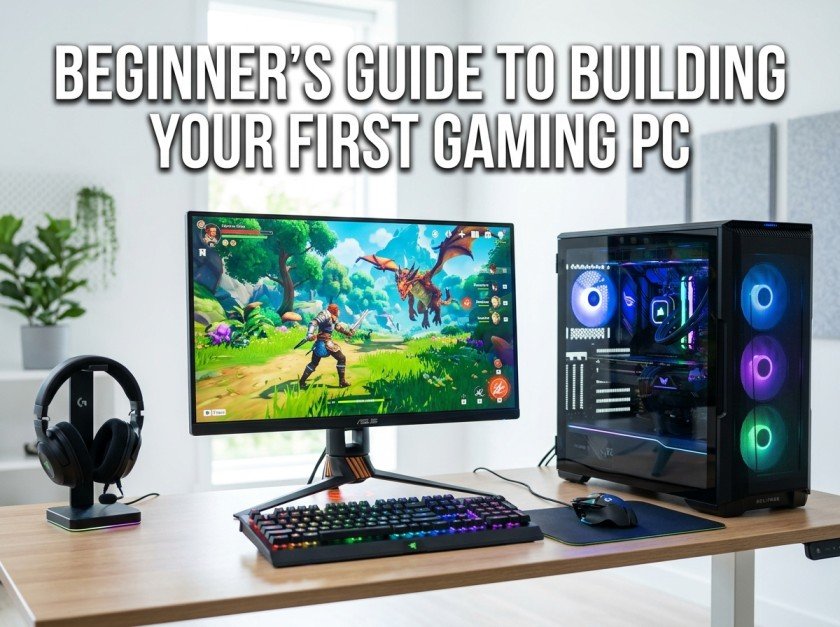
Buying your first gaming PC can be exciting, but building one yourself is even more rewarding. Many people think building a computer is difficult or only meant for experts. In reality, modern PC components are designed to fit together easily, and with a little patience, almost anyone can build a reliable gaming system.
Building your own PC also gives you complete control over performance, budget, and future upgrades. Instead of paying extra for a pre-built machine, you can invest your money in the parts that matter most to your gaming experience.
This guide explains everything you need to know before building your first gaming PC. Whether you have a small budget or want a system that can grow over time, understanding the basics will help you make smart decisions and avoid expensive mistakes.
Why Build Instead of Buy?
Pre-built gaming computers offer convenience, but they often come with compromises. Some use lower-quality power supplies, limited upgrade options, or unnecessary software that slows the system.
Building your own PC gives you several advantages:
- Better value for your money
- Higher-quality components
- Easier future upgrades
- Better cooling options
- A deeper understanding of your computer
Many first-time builders are surprised by how satisfying the process becomes once the computer powers on successfully.
Understanding the Main Components
Every gaming PC is made up of several key parts that work together.
Processor (CPU)
The processor acts as the brain of your computer. It handles calculations, game logic, and multitasking.
A modern multi-core processor provides smooth performance for gaming, streaming, and everyday tasks. Choose a CPU that matches both your budget and the graphics card you plan to use.
Graphics Card (GPU)
The graphics card is the most important component for gaming performance.
It renders game graphics, lighting effects, and visual details. If gaming is your primary goal, a significant portion of your budget should be allocated to the GPU.
Motherboard
The motherboard connects every component together.
When choosing one, make sure it is compatible with your processor and supports future upgrades such as additional storage or faster memory.
Memory (RAM)
RAM stores temporary data while programs are running.
For most modern games, 16 GB provides a comfortable balance between price and performance. More memory can help with multitasking or creative applications.
Storage
Solid State Drives (SSDs) have become the preferred choice because they dramatically reduce loading times.
Installing your operating system and favorite games on an SSD makes the entire computer feel faster and more responsive.
Power Supply (PSU)
A reliable power supply protects every component inside your PC.
Never choose the cheapest option available. A quality PSU improves stability and provides room for future upgrades.
PC Case
The case is more than just appearance.
A well-designed case improves airflow, simplifies cable management, and makes future maintenance easier.
Setting a Realistic Budget
One of the biggest mistakes beginners make is spending too much on one component while ignoring others.
Instead, build a balanced system.
For example:
- Largest portion for the graphics card
- Moderate investment in the processor
- Reliable power supply
- Fast SSD
- Quality case with good airflow
A balanced computer often performs better than one with a powerful GPU paired with weaker supporting components.
Cooling Matters
Heat affects performance and hardware lifespan.
Good airflow keeps temperatures under control.
Simple ways to improve cooling include:
- Using front intake fans
- Keeping cables organized
- Cleaning dust regularly
- Ensuring enough space around the computer
Most beginner systems work perfectly with quality air cooling.
Common Beginner Mistakes
Ignoring Compatibility
Always check that your processor, motherboard, and memory are compatible before purchasing.
Buying Too Little Storage
Modern games can easily exceed 100 GB each.
Choosing a larger SSD from the beginning helps avoid constant storage management.
Choosing a Cheap Power Supply
The PSU is often overlooked.
Investing in a reputable unit protects your entire system and improves long-term reliability.
Forgetting Airflow
A beautiful case with poor ventilation may lead to higher temperatures and reduced performance.
Always prioritize airflow over appearance.
Overspending on RGB Lighting
Decorative lighting can make a system look impressive, but it doesn’t improve gaming performance.
If your budget is limited, prioritize hardware over aesthetics.
Assembly Tips
Take your time during assembly.
Work on a clean table with good lighting and organize all screws before starting.
Install the processor carefully, apply the appropriate amount of thermal paste if needed, and mount the CPU cooler securely.
Adding RAM, storage, and the graphics card is usually straightforward when following the motherboard manual.
After everything is installed, double-check all power connections before turning the computer on.
Installing Software
Once the hardware is assembled, install your operating system and the latest drivers for your graphics card, motherboard, and other components.
Keeping drivers updated improves stability, fixes bugs, and can even increase gaming performance in newly released titles.
Planning for Future Upgrades
One advantage of building your own PC is flexibility.
Over time, you may want to upgrade:
- Graphics card
- Additional SSD storage
- More RAM
- Better cooling
- Faster processor (if supported)
Planning ahead when selecting your motherboard and power supply makes future upgrades much easier.
Final Thoughts
Building your first gaming PC may seem intimidating, but it’s a skill that becomes much easier once you understand the purpose of each component. By focusing on balanced hardware, choosing reliable parts, and taking your time during assembly, you can create a gaming system that delivers excellent performance without exceeding your budget.
The experience of pressing the power button for the first time and seeing your custom-built computer come to life is incredibly rewarding. More importantly, you’ll gain confidence in maintaining and upgrading your system for years to come.
Whether your goal is competitive gaming, exploring open-world adventures, or simply enjoying smoother performance, building your own PC is an investment in both your gaming experience and your technical knowledge.